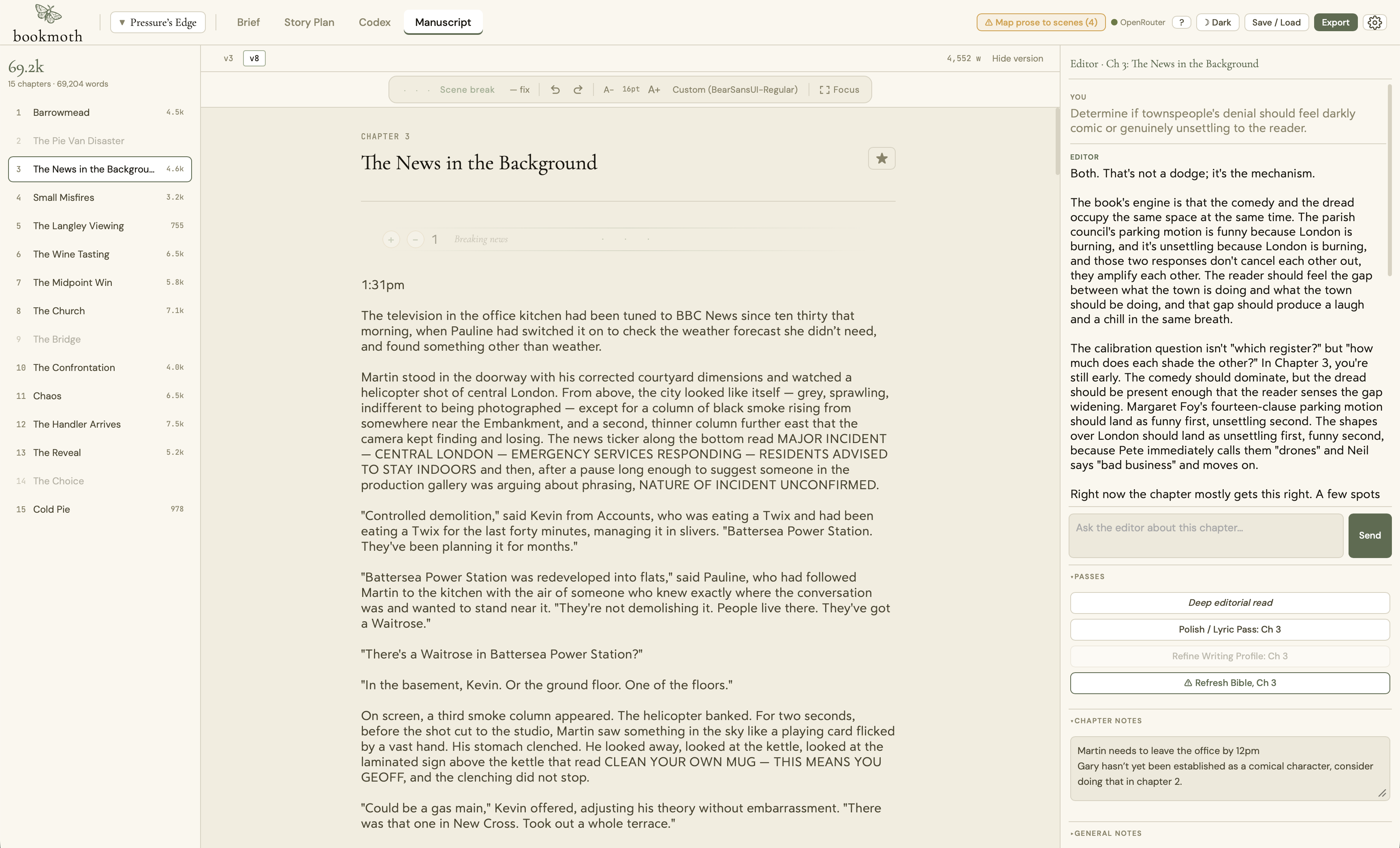
It has been a little while since 2.1, and bookmoth has moved a long way in that time. 2.3.3 bundles two full releases into a single free update, so there is a lot here. Nothing in your existing projects changes on its own: your novels and non-fiction books open exactly as before, and the new project types only appear when you start something new. Here is what changed, and why it matters.
A Story Plan you can pick up and move
The old Chapter Plan is now the Story Plan, and alongside your chapter cards there is a new Scene View: every scene in the book laid out under its chapter, and all of it drags.
- Rearrange by dragging. Reorder scenes, move one into a different chapter, or drag whole chapters into a new shape. A clear insertion line shows exactly where a scene or chapter will land.
- The prose travels. Move a scene and its words, its beat, and its notes go with it. Move it to another chapter and it takes its prose across.
- One undo puts it back. Any move, even one that spans two chapters, reverses in a single step, and the view stays where you left it rather than jumping to the top.
- The shape stays a choice. Group chapters into acts and rename them, set a status on any scene, edit the beat, goal, conflict, and turn inline, and read progress off every card.
Rearranging your book should be an experiment, not a commitment.
bookmoth writes more than novels now
Until now bookmoth assumed you were writing a book. You still can, and novels and non-fiction books work exactly as before. But a new project now has a type: novel, non-fiction book, essay, or article, and the app reshapes itself around what you picked.
- A Research tab for shortform. Paste a link and bookmoth fetches the article, strips the menus and ads, and pulls out a clean read with its byline and source. Add your own note on how it is relevant, tag and filter your sources, and every one is available to the draft so the piece is grounded in what you gathered.
- An Outline you can drag. Set your angle and working title, generate an outline from your brief and research, then edit, reorder, and delete sections inline.
- Footnotes that cite your sources. bookmoth suggests footnotes drawn from your research, you approve or reject each one, and on a print-ready PDF they can sit at the foot of the page they fall on. Your prose is never edited to insert them.
- Piece-shaped export. Copy the whole piece for a CMS or Substack, or export clean Markdown, Word, or plain text, with an optional sources appendix.
- A Notebook for non-fiction books. The codex becomes a Notebook built around real people, places, concepts, terms, sources, and events, with entries you can add straight from a link.
You can watch bookmoth write
Writing a long chapter used to be a black box. You pressed Write and waited. Now there is a live view.
- A writing activity panel shows the stage bookmoth is on, an elapsed timer, a running log of steps, and the prose arriving as it is written. Stop it at any point.
- Move it and pause it. Drag the panel out of your way, or pause it to freeze the view and read the full draft so far while writing carries on behind it.
- Per-scene word targets. When you draft only some scenes of a chapter, each gets its own word target with a running total, so five scenes no longer turn one number into a draft several times longer than you asked for.
- Overwrite, or keep both. When you write over prose that already exists, bookmoth asks whether to overwrite in place or save the result as a new version, so an earlier draft is never lost.
The editor grew up
The manuscript editor is steadier and more capable, and it now closes the loop between your prose and your plan.
- It updates your plan and codex from a finished chapter. Ask it to read a chapter you have written and it brings your Story Plan and Codex up to date, every change filed for your review and named, so you always know exactly what moved.
- Its own model. A per-editor model setting lets you run the editor on a different model from your drafting.
- It stays with your live prose. The editor reads the chapter you are on, your brief, your profile, the plan, and the codex entries that matter, and highlight-to-edit proposes a change to just your selection, shown as a diff you accept or dismiss.
- Steadier under the hood. A family of bugs that could make it loop, claim work it had not done, or lose track of your request mid-conversation has been hunted down and fixed. It is quicker to trust now, and it earns it.
Pasting is fixed for good
If you draft in another app and paste chapters in, this one is for you. Pasted prose now lands exactly as you copied it, spacing and all, the scene structure holds, and a single undo reverses the whole paste. In older versions a paste could quietly tangle a chapter’s scenes, and in the worst case cost words. That is gone.
Make the app your own
A big round of work on how bookmoth looks and feels, all behind a single settings gear in the top right.
- Build your own theme, with its own light and its own dark, choosing your background, text, accent, and highlight colours, and watch the whole app reskin live as you flip between them. Alongside the classic bookmoth, plus Paradice and Mithril.
- Snapshots you can roll back to. Save the state of a project at any moment and restore it later, with an automatic safety snapshot taken before any restore.
- Custom fonts and line spacing. Load your own font file, set the reading rhythm you like in both the manuscript and the editor chat, and work in a roomier editor that grows as you type.
- A print-ready book. Typeset export turns a finished manuscript into a properly set PDF, with control over trim size, margins, and running heads, previewed live.
A smarter codex, and a lighter bill
- Import your own notes. Paste your existing characters, places, and lore in any rough shape and bookmoth maps them into reviewable entries. Nothing is ever overwritten: entries are matched by name and alias, and you review every suggestion.
- Merge and group. Fold one entry into another, combining aliases and details, and organise the codex into groups you can drag between.
- Lower running costs. Background steps run on a lighter model, a long session reuses what it already loaded for up to an hour, and the voice check and codex auto-scan are opt-in, so you only pay for them when you want them. Your drafting model is unchanged.
Quality, polish, and fixes worth calling out
- Fewer AI tells in drafts. With a writing profile loaded, bookmoth guards against the machine reflexes that give AI prose away while still respecting a voice that is genuinely clipped or spare. It defers to your profile, it does not flatten it.
- Cleaner prose. Straight quotes become proper curly quotes as you write, bold and italic carry through to export, and drafts land closer to the length you asked for.
- Your settings stop resetting. A bug that cleared part of the app’s local storage on launch, resetting your theme and toggles, is fixed. You will see the welcome once more after this update, then it stays gone.
- A built-in bug report. If you hit a problem, a button in Settings creates a diagnostic snapshot you can send over. Your API keys are stripped out and your chapters are not included, and it is plain text you can read before you send it.
What has not changed
- One-time purchase. No subscription, ever.
- Bring your own key. Your words and your API keys stay on your machine.
- No server in the middle, and no training on your work.
- The AI never changes your manuscript on its own. Every edit goes through a diff you approve and a version you can roll back.
That is the whole idea behind bookmoth: a grown-up writing tool with the writer in charge the entire way through, and AI that assists rather than takes over. 2.3.3 makes it deeper, faster, and more flexible without giving an inch on any of that. Update from inside the app, or download the latest at bookmoth.app/download.html.